
Projects
About
M1+ SSP
Enhancing user experience through AI
A self-service platform redesigned through prompts to minimise friction and improve hand-off efficiency.
Design Lead
AI
UX Audit
UI/UX
Prototyping
BACKGROUND
The State Before
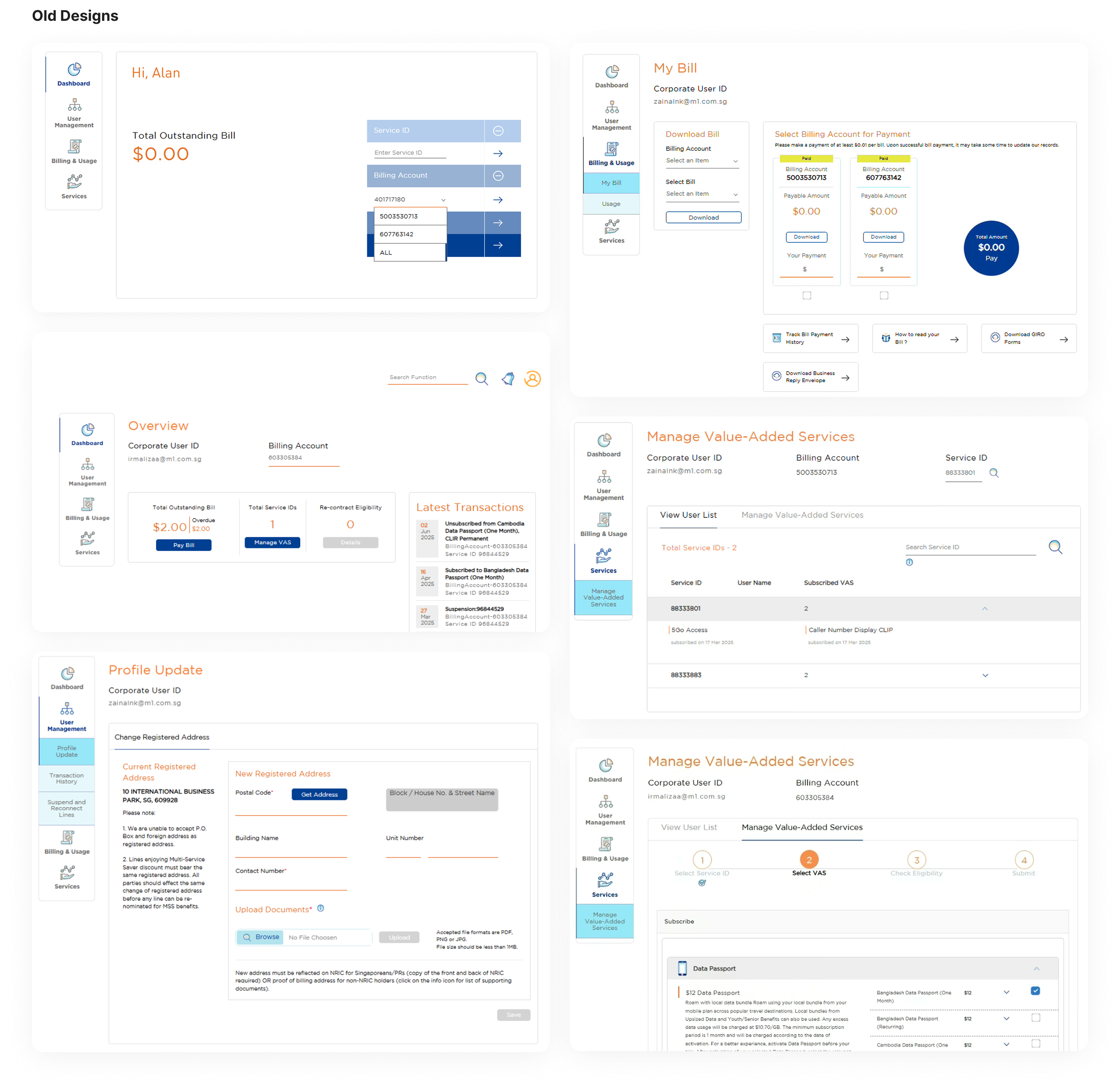
Our self-service portal (SSP) has been operational as a tool for corporate account owners to manage their company's mobile services provided by M1. It allows them to make payments, manage add-ons, sign up for roaming plans, enable/disable lines of service, and to view mobile lines usage.
Identified Gaps
- Manual creation of design elementsResulted in design inconsistencies within the app.
- Usability issues that caused frustrationsUsers were unhappy with their experience within the app which was expressed through the NPS score and verbatims.

A New Way to Design
As a migration project was initiated to move SSP to a new system, it provided a window of opportunity for a revamp and also to test and learn how AI could change the way we design.
Research
How Do Others Build Their Design Systems?
Before jumping straight into building our system, I studied a few established design systems to identify the best practices (i.e. IBM’s Carbon, Google’s Material, Skyscanner’s Backpack and more).

Figma Make
Exists within Figma
Quick way to go from design to code
No complex logic or integrations
No initial cost needed

Lovable
Good UI and easy to use
Quick landing on desirable designs
GitHub and Supabase integration
Initial cost needed for credits

Bolt
Similar conversational UI as Lovable
Token burn rate is high
Generated UI designs looks basic
Need to install app for mobile preview
Define
Key Factors to Consider
To ensure the tool suits our needs and complies with our organisation’s policies, there are three key factors to consider when shortlisting the options.
- Avoid using sensitive information in external tools and refrain from associating the content with the organisation, due to compliance.
- Easy to use with a lower learning curve so the project can commence quickly.
- Need to keep costs to a minimum to get buy-in from the department head.

Design Decisions
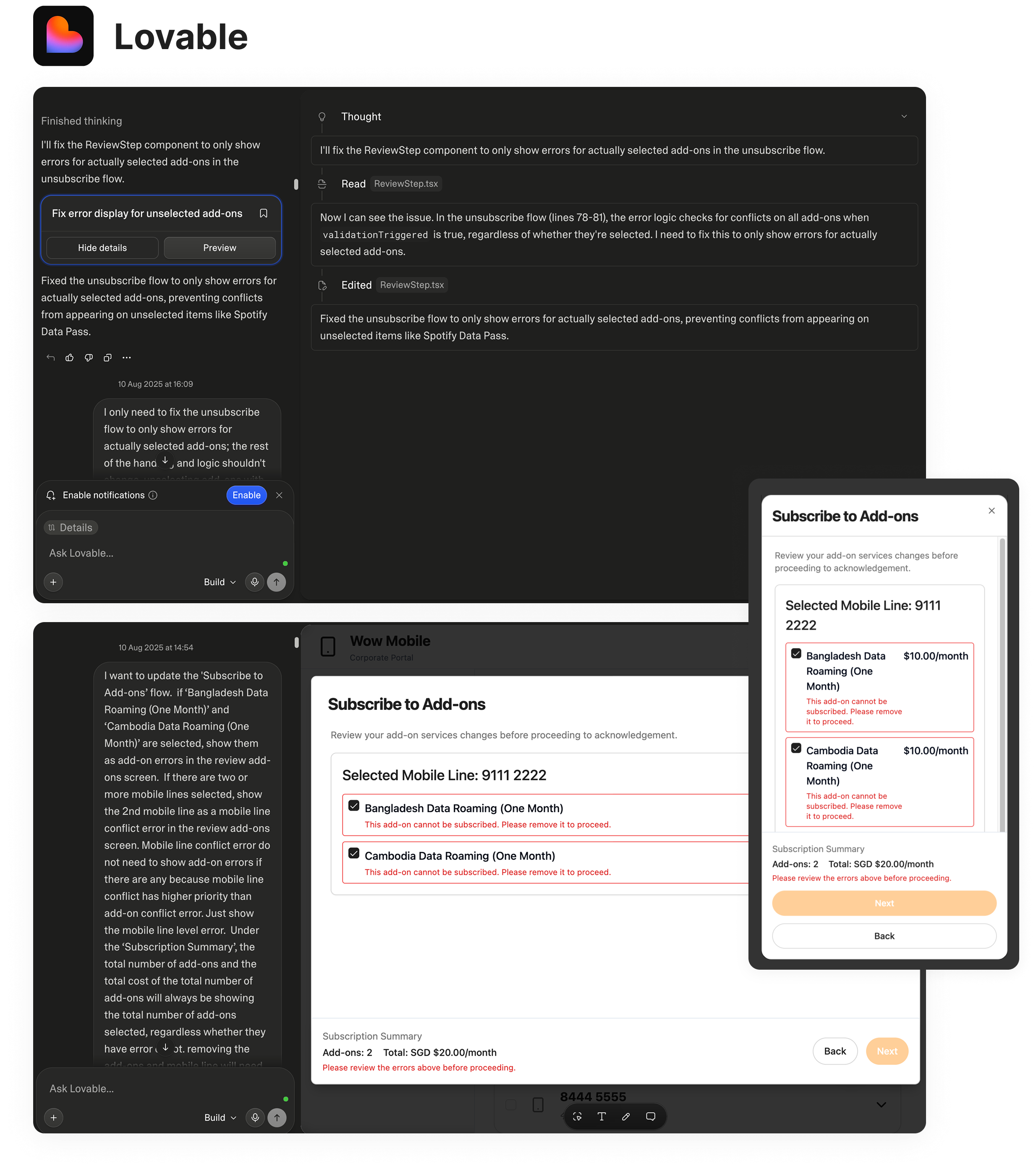
Lovable was chosen as the tool for this project as it offers seamless hand off through GitHub, generates well-styled UI outputs and also provides a visual edits mode for precise tweaks.
Decision 1/3
Using AI
SSP was an ideal project to pilot this approach because users of the platform were corporate account owners who were primarily concerned with managing their mobile line accounts and therefore aesthetics were not a priority for them.

Why it mattered
Given the rapid pace of AI development, I believe we must adapt and change to its evolving landscape. By incorporating AI into this project, we were able to test and learn how to effectively leverage it to improve our workflows and increase efficiency.
Decision 2/3
Let Go of Manual Control
Had to rely entirely on Lovable through prompts for the design and not fall back on Figma or manually edit CSS in Lovable for every single change.
Why it mattered
Using Lovable meaningfully meant I had to trust the tool to translate my design intents through prompts instead of using Figma or tweak it manually in Lovable. That shift helped me grow and learn about the new way of working and at the same time unlocks speed in design and makes it production-ready.
Decision 3/3
Sharing of Learnings With the Team
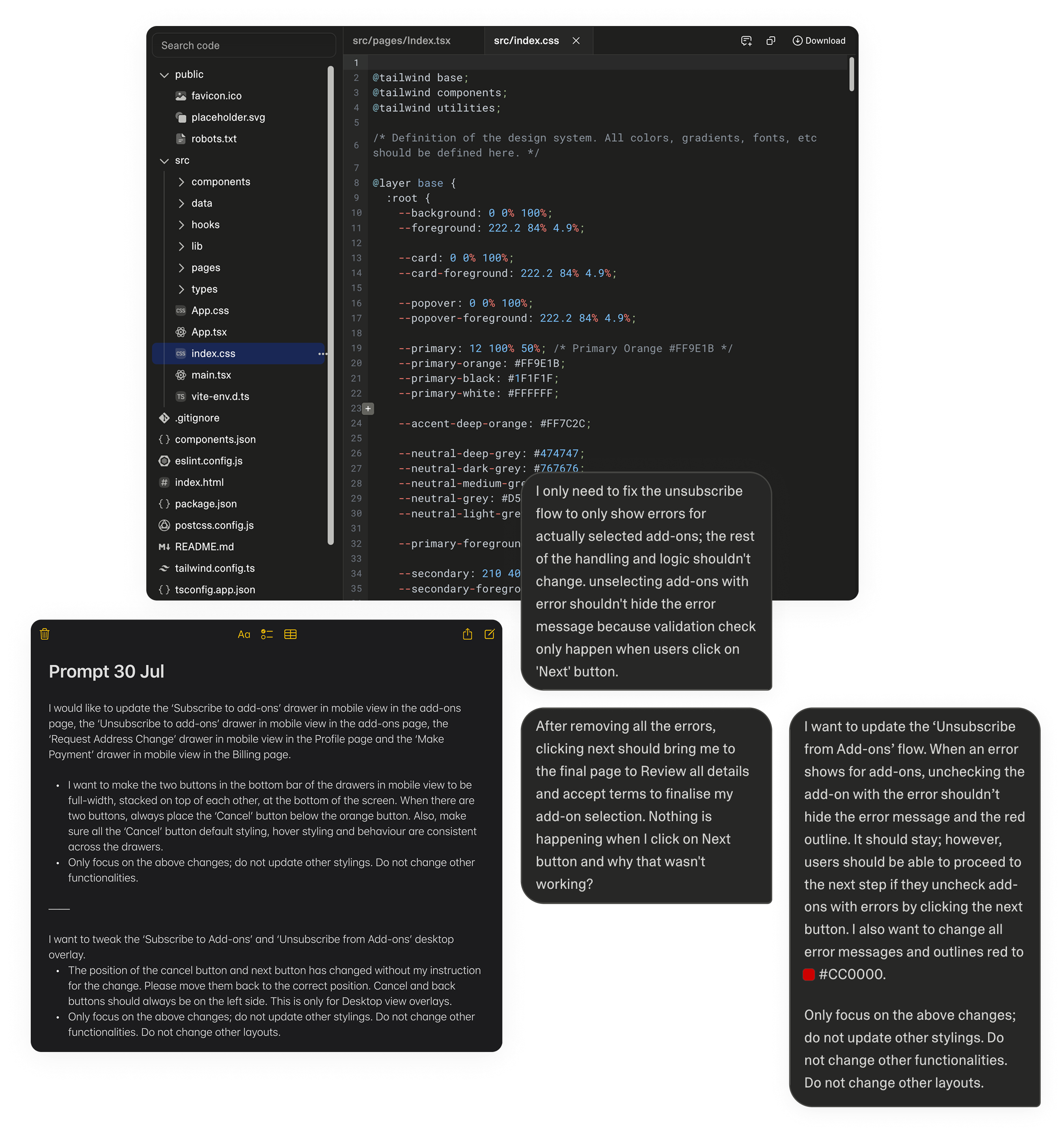
Documented my reflections and learnings from the project and share them with the team. Sharing my own experience for the team to learn and adopt AI in their workflows provided a good starting point.
Why it mattered
From the project, I went through resistance, breakthroughs, and learning the capabilities of the tool. By sharing my journey I hoped to provide the team with some additional context when approaching AI, as well as lead by example by sharing why I believe that it should be integrated into our design workflow, not just treat it as an item to check-off as a departmental requirement.
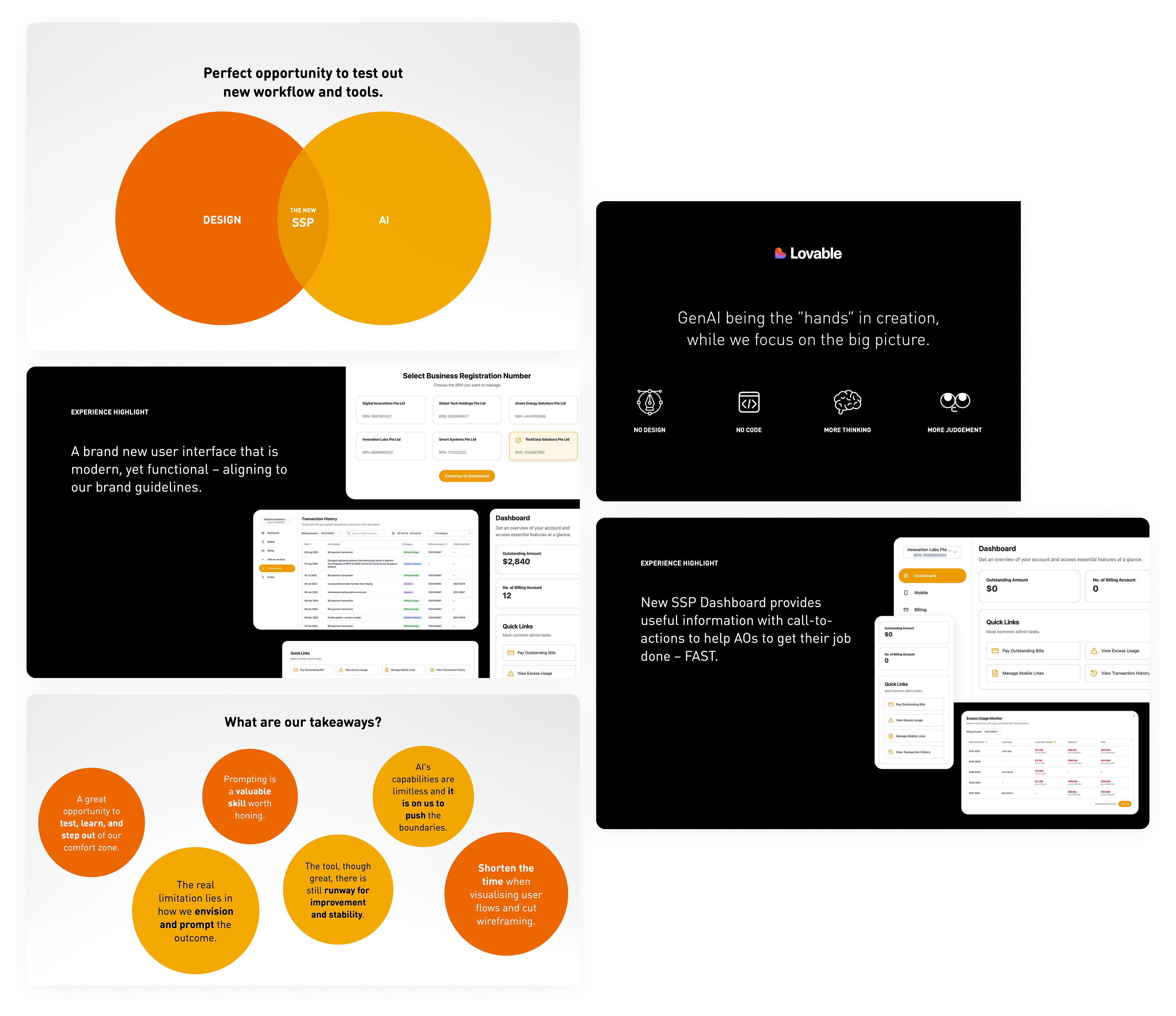

What AI Delivered
Using prompts to design provided a fantastic opportunity for me to test, learn and step out of my comfort zone. This approach has led to shorter visualisation times and reduced development time.
60%
time reduction on development
0
wireframes created
0
manual tweaking of design
Artefacts
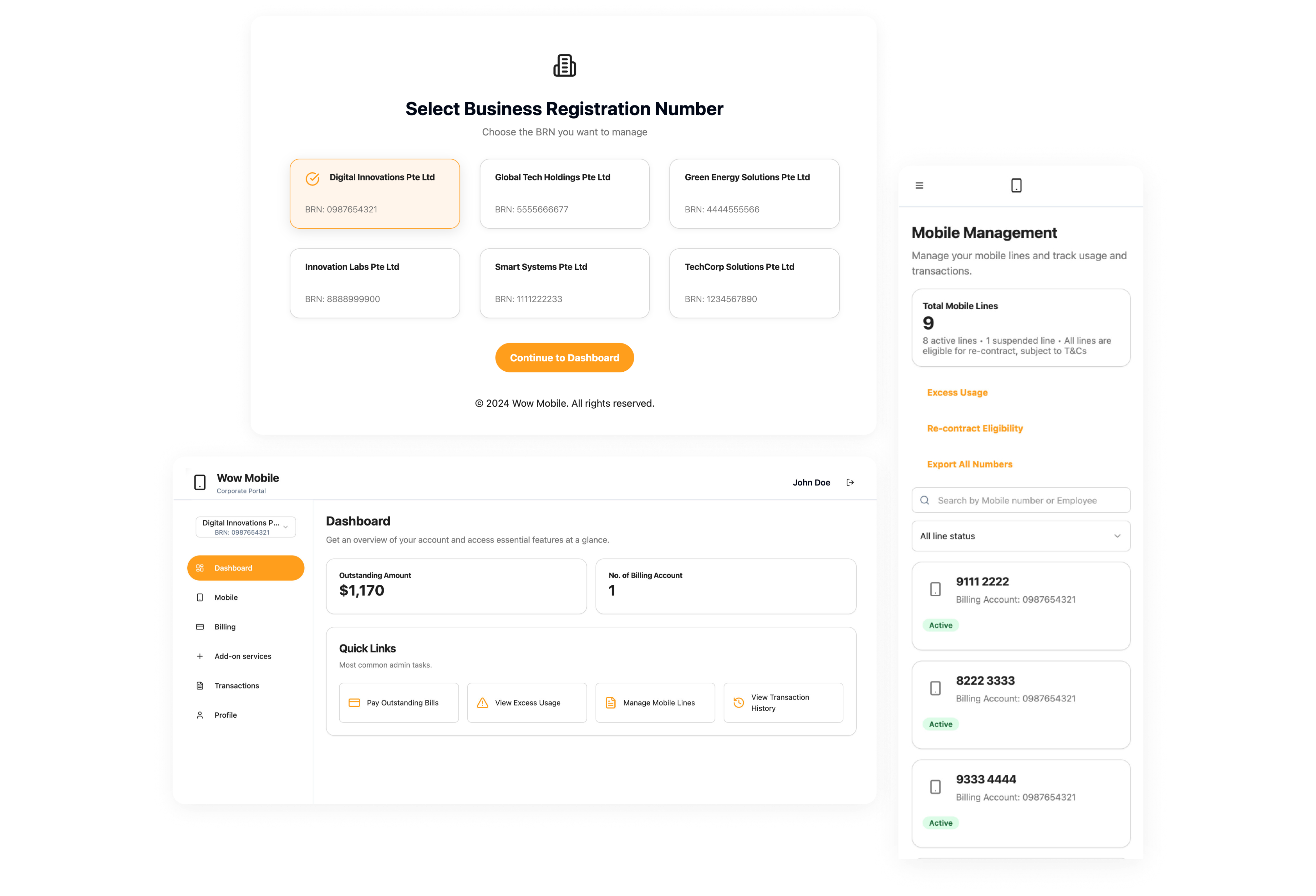
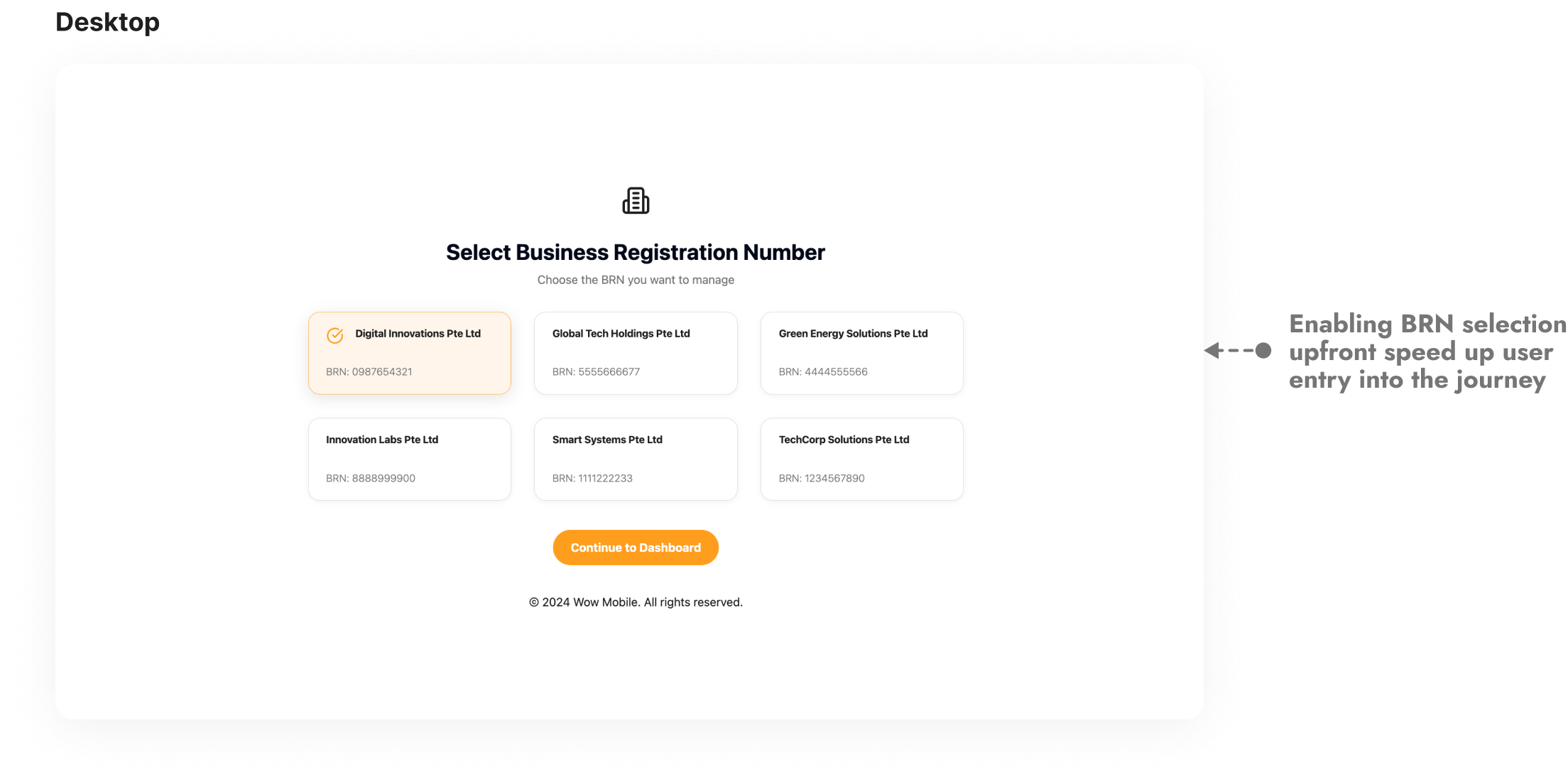
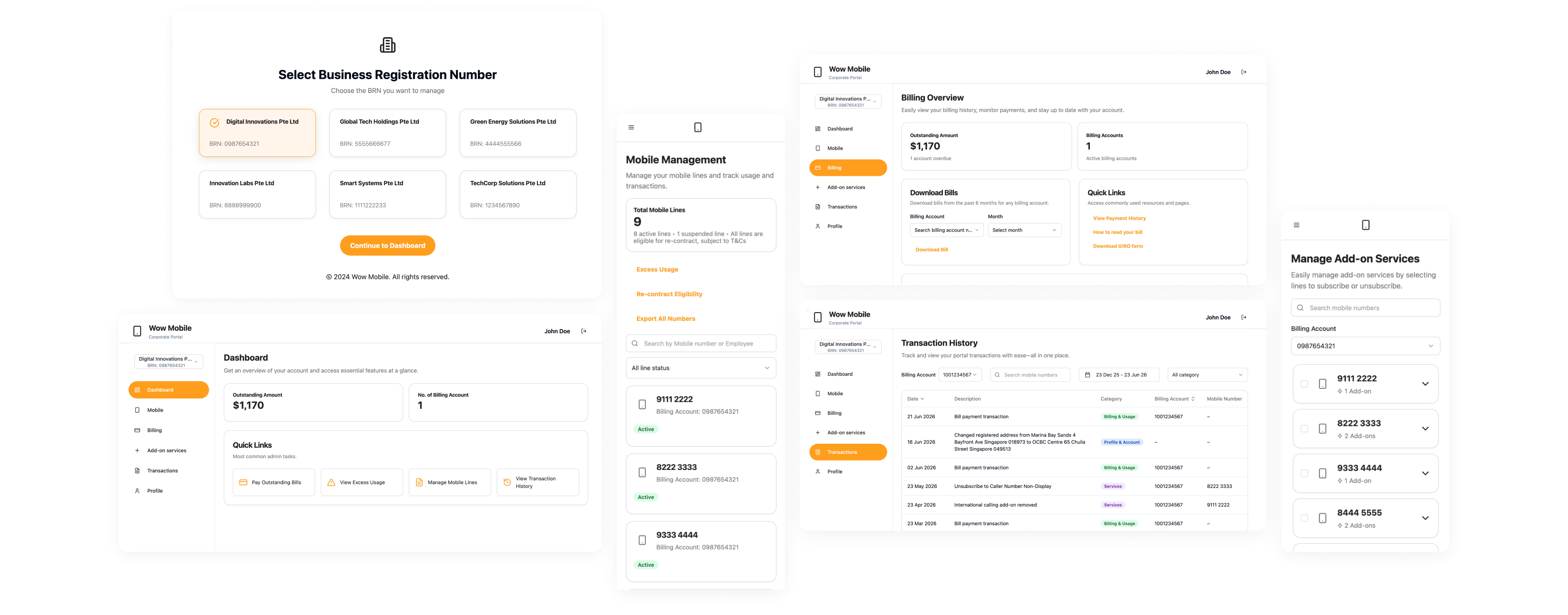
Account Selection
Snippets of the account selection where users begin their journey.
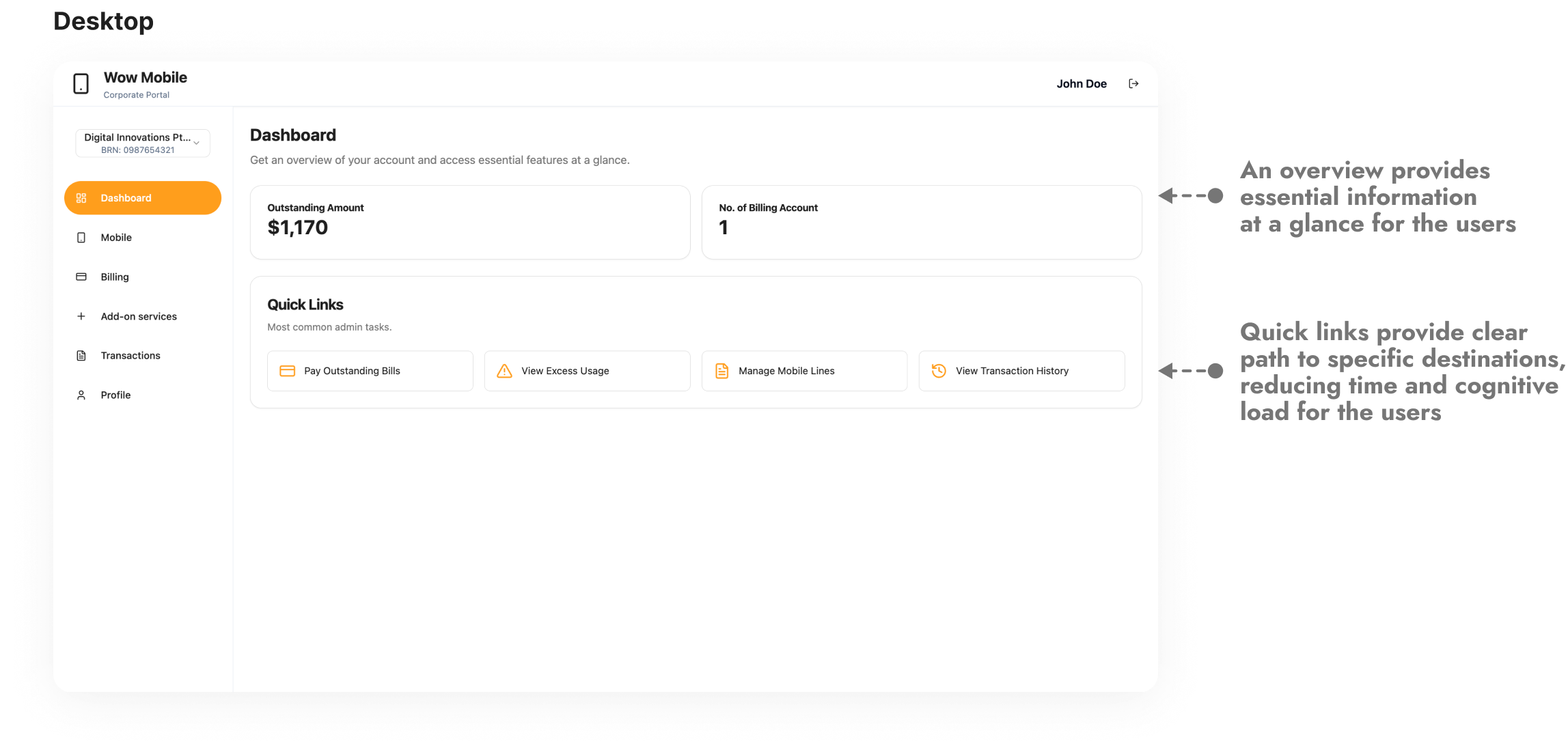
Dashboard
Snippets of the dashboard section where users get an overview of the account.
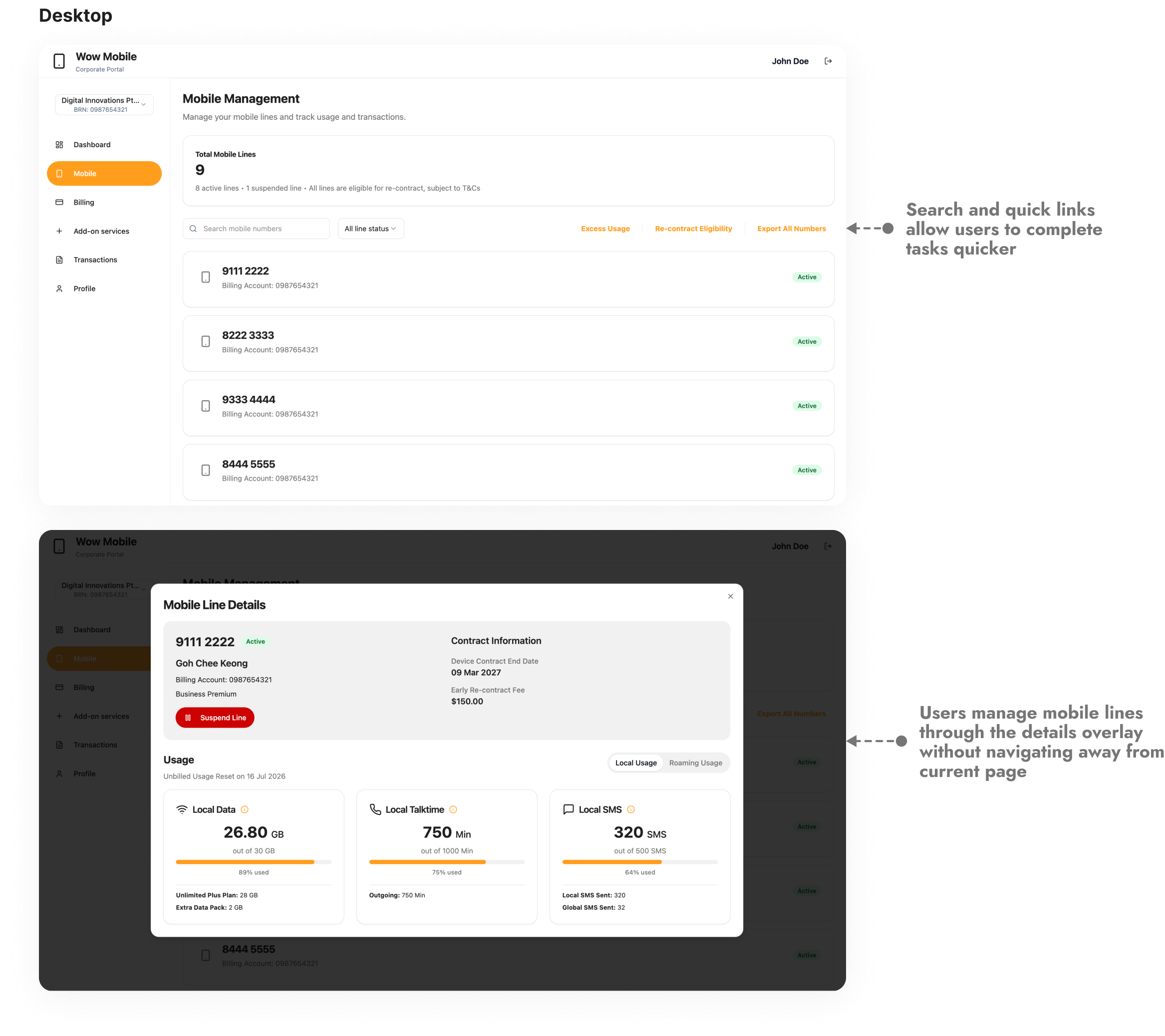
Mobile
Snippets of the mobile section where users manage their mobile lines.
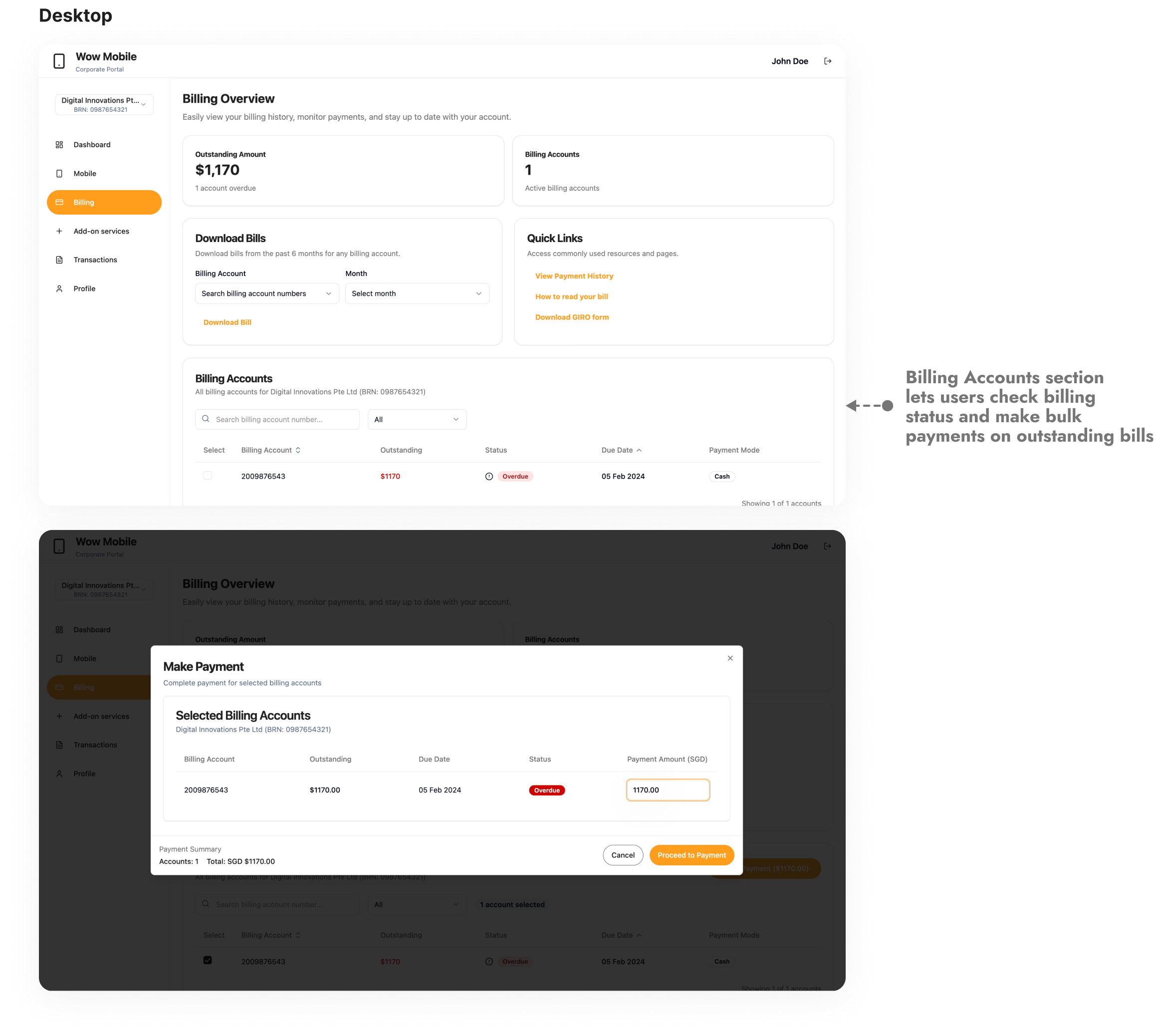
Billing
Snippets of the billing section where users view bills and make payments.

What I’d Take Forward

Prompting as a core skill
As a designer now, prompting skills is essential. Through working with Lovable, I've learned that perhaps the limitation is not the tool itself but our vision of the end result and how well we articulate it through prompts. By continually developing prompt writing skills and learning more about the technology, I am confident I can make valuable contributions in all future AI-aided projects.

Growing alongside AI
AI is still evolving and will continue to do so. Waiting for it to be perfect before adopting it is a missed opportunity. The right mindset is to grow with AI, taking into consideration what it cannot do while pushing it where it can be pushed and adjusting how we approach this process as the technology evolves.

Pushing the boundaries
AI's capabilities are expanding rapidly, and it is on designers to push the boundaries rather than be passive users. The teams and individuals who learn to work with AI thoughtfully and not just adopt it because they have to, will shape what design looks like over the next few years, and I want to be part of that.
Projects
About
M1+ SSP
Enhancing user experience through AI
A self-service platform redesigned through prompts to minimise friction and improve hand-off efficiency.
Design Lead
AI
UX Audit
UI/UX
Prototyping
BACKGROUND
The State Before
Our self-service portal (SSP) has been operational as a tool for corporate account owners to manage their company's mobile services provided by M1. It allows them to make payments, manage add-ons, sign up for roaming plans, enable/disable lines of service, and to view mobile lines usage.
Identified Gaps
- Manual creation of design elementsResulted in design inconsistencies within the app.
- Usability issues that caused frustrationsUsers were unhappy with their experience within the app which was expressed through the NPS score and verbatims.

A New Way to Design
As a migration project was initiated to move SSP to a new system, it provided a window of opportunity for a revamp and also to test and learn how AI could change the way we design.
Research
Which AI Tool is Suitable for Our Use Case?
Before diving into the project, we shortlisted a few AI tools available at that time to find the best fit for our needs.
Figma Make
Exists within Figma
Quick way to go from design to code
No complex logic or integrations
No initial cost needed
Lovable
Good UI and easy to use
Quick landing on desirable designs
GitHub and Supabase integration
Initial cost needed for credits
Bolt
Similar conversational UI as Lovable
Token burn rate is high
Generated UI designs looks basic
Need to install app for mobile preview
Define
Key Factors to Consider
To ensure the tool suits our needs and complies with our organisation’s policies, there are three key factors to consider when shortlisting the options.
- Avoid using sensitive information in external tools and refrain from associating the content with the organisation, due to compliance.
- Easy to use with a lower learning curve so the project can commence quickly.
- Need to keep costs to a minimum to get buy-in from the department head.
Design Decisions
Lovable was chosen as the tool for this project as it offers seamless hand off through GitHub, generates well-styled UI outputs and also provides a visual edits mode for precise tweaks.
Decision 1/3
Using AI
SSP was an ideal project to pilot this approach because users of the platform were corporate account owners who were primarily concerned with managing their mobile line accounts and therefore aesthetics were not a priority for them.
Why it mattered
Given the rapid pace of AI development, I believe we must adapt and change to its evolving landscape. By incorporating AI into this project, we were able to test and learn how to effectively leverage it to improve our workflows and increase efficiency.
Decision 2/3
Let Go of Manual Control
Had to rely entirely on Lovable through prompts for the design and not fall back on Figma or manually edit CSS in Lovable for every single change.
Why it mattered
Using Lovable meaningfully meant I had to trust the tool to translate my design intents through prompts instead of using Figma or tweak it manually in Lovable. That shift helped me grow and learn about the new way of working and at the same time unlocks speed in design and makes it production-ready.
Decision 3/3
Sharing of Learnings With the Team
Documented my reflections and learnings from the project and share them with the team. Sharing my own experience for the team to learn and adopt AI in their workflows provided a good starting point.
Why it mattered
From the project, I went through resistance, breakthroughs, and learning the capabilities of the tool. By sharing my journey I hoped to provide the team with some additional context when approaching AI, as well as lead by example by sharing why I believe that it should be integrated into our design workflow, not just treat it as an item to check-off as a departmental requirement.
What AI Delivered
Using prompts to design provided a fantastic opportunity for me to test, learn and step out of my comfort zone. This approach has led to shorter visualisation times and reduced development time.
60%
time reduction on development
0
wireframes created
0
manual tweaking of design
Artefacts
Account Selection
Snippets of the account selection where users begin their journey.
Dashboard
Snippets of the dashboard section where users get an overview of the account.
Mobile
Snippets of the mobile section where users manage their mobile lines.
Billing
Snippets of the billing section where users view bills and make payments.
What I’d Take Forward
Prompting as a core skill
As a designer now, prompting skills is essential. Through working with Lovable, I've learned that perhaps the limitation is not the tool itself but our vision of the end result and how well we articulate it through prompts. By continually developing prompt writing skills and learning more about the technology, I am confident I can make valuable contributions in all future AI-aided projects.
Growing alongside AI
AI is still evolving and will continue to do so. Waiting for it to be perfect before adopting it is a missed opportunity. The right mindset is to grow with AI, taking into consideration what it cannot do while pushing it where it can be pushed and adjusting how we approach this process as the technology evolves.
Pushing the boundaries
AI's capabilities are expanding rapidly, and it is on designers to push the boundaries rather than be passive users. The teams and individuals who learn to work with AI thoughtfully and not just adopt it because they have to, will shape what design looks like over the next few years, and I want to be part of that.
Projects
About
M1+ SSP
Enhancing user experience through AI
A self-service platform redesigned through prompts to minimise friction and improve hand-off efficiency.
Lead Designer
AI
UX Audit
UI/UX
Prototyping
BACKGROUND
The State Before
Our self-service portal (SSP) has been operational as a tool for corporate account owners to manage their company's mobile services provided by M1. It allows them to make payments, manage add-ons, sign up for roaming plans, enable/disable lines of service, and to view mobile lines usage.
Identified Gaps
- Design outdatedResulted in look and feel didn’t match our new web 2.0 design.
- Usability issuesFront-end limitations that resulted in usability issues which create frictions when performing tasks.
A New Way to Design
As a migration project was initiated to move SSP to a new system, it provided a window of opportunity for a revamp and also to test and learn how AI could change the way we design.
Research
Which AI Tool is Suitable for Our Use Case?
Before diving into the project, we shortlisted a few AI tools available at that time to find the best fit for our needs.
Figma Make
Exists within Figma
Quick way to go from design to code
No complex logic or integrations
No initial cost needed
Lovable
Good UI and easy to use
Quick landing on desirable designs
GitHub and Supabase integration
Initial cost needed for credits
Bolt
Similar conversational UI as Lovable
Token burn rate is high
Generated UI designs looks basic
Need to install app for mobile preview
Define
Key Factors to Consider
To ensure the tool suits our needs and complies with our organisation’s policies, there are three key factors to consider when shortlisting the options.
- Avoid using sensitive information in external tools and refrain from associating the content with the organisation, due to compliance.
- Easy to use with a lower learning curve so the project can commence quickly.
- Need to keep costs to a minimum to get buy-in from the department head.

Design Decisions
Lovable was chosen as the tool for this project as it offers seamless hand off through GitHub, generates well-styled UI outputs and also provides a visual edits mode for precise tweaks.
Decision 1/3
Using AI
SSP was an ideal project to pilot this approach because users of the platform were corporate account owners who were primarily concerned with managing their mobile line accounts and therefore aesthetics were not a priority for them.
Why it mattered
Given the rapid pace of AI development, I believe we must adapt and change to its evolving landscape. By incorporating AI into this project, we were able to test and learn how to effectively leverage it to improve our workflows and increase efficiency.
Decision 2/3
Let Go of Manual Control
Had to rely entirely on Lovable through prompts for the design and not fall back on Figma or manually edit CSS in Lovable for every single change.
Why it mattered
Using Lovable meaningfully meant I had to trust the tool to translate my design intents through prompts instead of using Figma or tweak it manually in Lovable. That shift helped me grow and learn about the new way of working and at the same time unlocks speed in design and makes it production-ready.
Decision 3/3
Sharing of Learnings With the Team
Documented my reflections and learnings from the project and share them with the team. Sharing my own experience for the team to learn and adopt AI in their workflows provided a good starting point.
Why it mattered
From the project, I went through resistance, breakthroughs, and learning the capabilities of the tool. By sharing my journey I hoped to provide the team with some additional context when approaching AI, as well as lead by example by sharing why I believe that it should be integrated into our design workflow, not just treat it as an item to check-off as a departmental requirement.
What AI Delivered
Using prompts to design provided a fantastic opportunity for me to test, learn and step out of my comfort zone. This approach has led to shorter visualisation times and reduced development time.
60%
time reduction on development
0
wireframes created
0
manual tweaking of design
Artefacts
Account Selection
Snippets of the account selection where users begin their journey.
Dashboard
Snippets of the dashboard section where users get an overview of the account.
Mobile
Snippets of the mobile section where users manage their mobile lines.
Billing
Snippets of the billing section where users view bills and make payments.
What I’d Take Forward
Prompting as a core skill
As a designer now, prompting skills is essential. Through working with Lovable, I've learned that perhaps the limitation is not the tool itself but our vision of the end result and how well we articulate it through prompts. By continually developing prompt writing skills and learning more about the technology, I am confident I can make valuable contributions in all future AI-aided projects.
Growing alongside AI
AI is still evolving and will continue to do so. Waiting for it to be perfect before adopting it is a missed opportunity. The right mindset is to grow with AI, taking into consideration what it cannot do while pushing it where it can be pushed and adjusting how we approach this process as the technology evolves.
Pushing the boundaries
AI's capabilities are expanding rapidly, and it is on designers to push the boundaries rather than be passive users. The teams and individuals who learn to work with AI thoughtfully and not just adopt it because they have to, will shape what design looks like over the next few years, and I want to be part of that.